Start Here
What actually happens between signing up and owning your first crypto
The exchange's own guide splits the process into four steps, and the order is not optional. Here is what each step actually asks of you, and the point where most people get stuck.

People talk about "buying crypto" as if it were one action. It is four, and they are chained: until one finishes, the button for the next one stays grey. Binance's own beginner guide splits it into registering an account, completing identity verification, buying or depositing crypto, and then trading.
The order matters because of step two. The guide states that identity verification "unlock[s] deposit, withdrawal, and trading limits" — so skipping it does not just delay trading, it leaves you unable to move money in or out. What follows is each step, and the place where it usually stalls.
The order the exchange itself uses
Register, verify, fund, trade. Security setup sits inside step two rather than at the end: the guide recommends enabling "at least one two-factor verification (2FA) for your account."
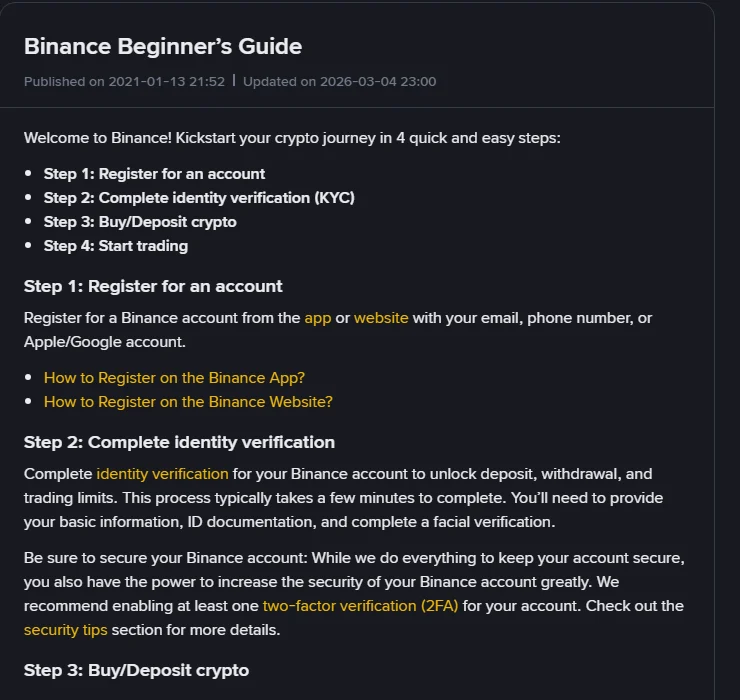
There is a logic to that sequence. The platform wants to know who you are before it lets money move, and it wants your account locked down before there is anything in it worth stealing. Anyone who jumps ahead to funding tends to discover it at the deposit screen, where the limits are still zero.
Step 1 — Registration, and the parts you cannot take back
Signing up takes a couple of minutes. The trap is the handful of one-time choices buried in it. The account type — personal or entity — cannot be changed after registration. A referral code, once linked, cannot be modified either.
So if you intend to sign up under someone's referral code or link, check it before you submit. If you would rather not be tied to one, clear that field before you submit. Neither decision can be revisited from inside the account later.
As for the entry points, email, phone number, Apple or Google account and Telegram all work. The practical difference is what you will log in with a year from now, and what you would need in order to recover access. The specifics — code lengths, password rules, and the two locked choices — are in Binance sign-up: the four entry points and two choices you cannot undo.
Step 2 — Verification is what unlocks your limits
This is the step that stalls most often, and the reasons are mundane. The guide says you submit "basic information, ID documentation, and complete a facial verification." In practice that means a legible photo of a physical document and a live face check.
What goes wrong: a corner of the document cropped out of frame, glare across the photo page, a dim room during the face check, or a stated country of residence that does not match the document you uploaded. Re-submitting the same rejected photo does not help — read the specific reason the platform gives and fix that one thing.
Binance’s own verification guide is specific about the rest. Most users can verify with a passport, ID card or driver’s license. You “upload both front and back sides of the ID Card” and only continue once both have uploaded successfully. For the face check: “do not wear hats, glasses, or use filters, and make sure that the lighting is sufficient.” And at the confirmation screen, “please make sure that all the information entered is consistent with your ID documents. You won’t be able to change it once confirmed.”
On timing, the same guide’s FAQ says submitted documents “are usually reviewed within 48 hours,” while adding that “it may take longer in some particular cases” — so a second day of silence is not yet a problem. Limits only become visible once verification clears, and they vary by platform and by verification tier. Read them on your own account page rather than trusting a number quoted in an article — including this one.
Step 3 — "Buy" and "deposit" are not the same thing
The guide presents step three as two parallel routes, and mixing them up wastes a lot of time.
Buying converts money you hold in a bank or on a card into crypto. The funding methods listed are bank transfer, credit or debit card, and P2P trading.
Depositing moves crypto you already own from another wallet or platform into this account. It assumes you have coins somewhere else already.
The test is simple: is your money currently sitting in a bank account, or is it already crypto? Bank means buy. Crypto means deposit. If you are depositing, the network you send from and the network the receiving address expects must match. Getting that wrong turns a transfer into a recovery request with no guaranteed outcome, which is why a small test transfer first is worth the extra fee.
Step 4 — Start with spot, not leverage
The final step lists "Spot, Margin, Futures, and Options markets." They appear side by side, which understates how different they are.
Spot means you pay for an asset and hold it; the most you can lose is what you put in. Margin and futures introduce borrowed funds and forced liquidation — move the price far enough against your position and the system closes it for you, which can take the whole deposit with it. Sticking to spot at the start is not caution, it is sequencing: learn what the order screen does before adding a mechanism that can close your position without asking.
Where people actually get stuck
- No verification code arrives. SMS and email fail for different reasons, and in some countries SMS verification is not covered at all. Sorted by symptom in No verification code during sign-up.
- Verification rejected. Usually photo quality or a mismatch between the document and the details you typed. Fix the stated reason rather than resubmitting.
- Deposit not arriving. Check the network on both ends and the confirmation count before you send anything a second time.
- Withdrawal blocked. Often incomplete verification, or a recent change to a security setting — platforms impose a holding period after those changes.
Where these figures are from
The four-step sequence, the wording about verification unlocking deposit, withdrawal and trading limits, the funding methods and the list of trading markets all come from Binance's Binance Beginner's Guide, published 2021-01-13 and updated 2026-03-04. The document types, the front-and-back upload instruction, the face-check conditions and the note that confirmed information cannot be changed come from How to Complete Identity Verification for a Personal Account?, updated 2026-06-05; the review-time wording is from that page’s FAQ section. Both pages were opened and checked on 17 September 2026.
No limit figures or fee percentages are quoted here on purpose. Those change often enough that the number on your own screen is the only one worth acting on.