Registration
Binance sign-up: the four entry points, and two choices you cannot undo
All four entry points lead to the same account. What differs is how you will log in later. Two things, though, are fixed the moment you submit: the account type and the referral code.
Binance offers four ways in: email address, phone number, an Apple or Google account, or Telegram. They all create the same account. What actually differs is what you will type at the login screen a year from now, what you would fall back on if you lost access, and whether a third-party account now sits between you and your money.
The decision worth slowing down for is elsewhere. Two things are set at sign-up and cannot be changed afterwards: the account type, and the referral code. Both appear early in the flow, and both are one-way doors.
What the sign-up form asks for
The form itself is short. On the phone field, the placeholder reads "Phone Number (without country code)" — the country code is picked separately from the dropdown beside it, so typing +44 or +65 into the field makes it part of the number.
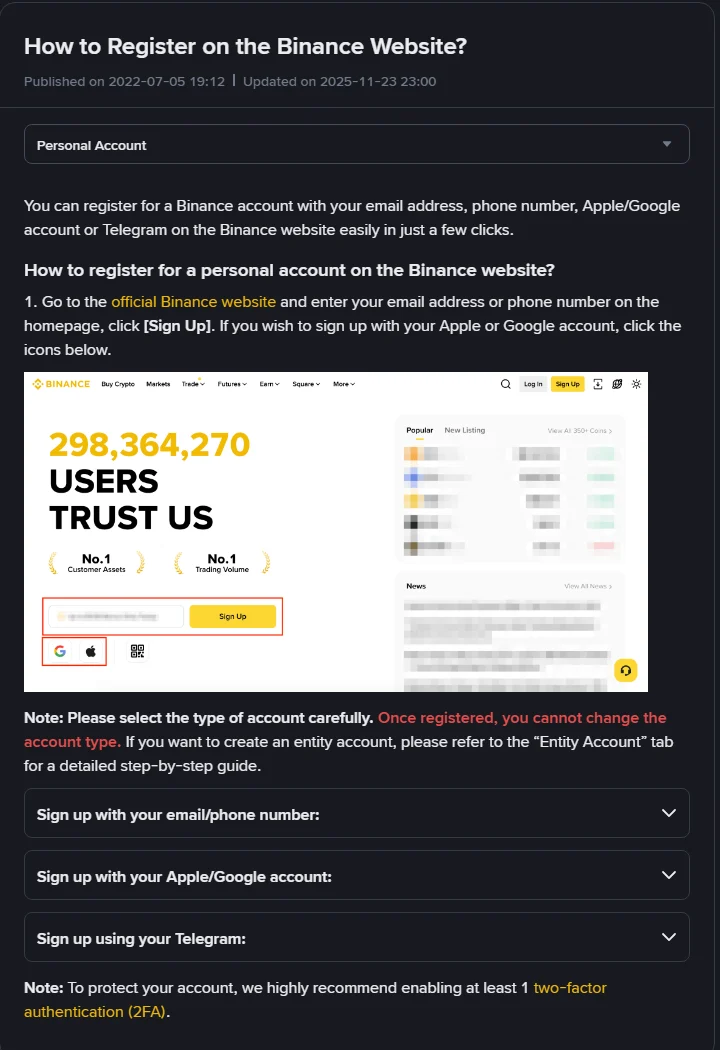
With email or phone you enter one of the two and continue; you do not need both to start. For Apple, Google or Telegram you use the icons under the form and authorise from there.
The verification code: 6 digits, 30 minutes
After you submit the account and accept the terms, a code is sent to whichever channel you used. The guide specifies a "6-digit verification code" and tells you to "enter the code within 30 minutes."
Past that window the code is dead and you request a fresh one — retyping the old digits will keep failing. If nothing arrives at all, the fix depends on whether you are waiting on SMS or on email; those fail for unrelated reasons, sorted out in No verification code during sign-up.
Password: at least 8 characters, one uppercase, one number
The stated rule is that your password "must contain at least 8 characters, with at least one uppercase letter and one number." Miss the capital or the digit and the next button simply refuses you.
Treat this one as a withdrawal-grade password rather than a throwaway: it should not match your email password. And if you signed up through Apple, Google or Telegram, note that there is no separate exchange password at all — whoever controls that account controls the door to this one, so its own two-factor setting matters just as much.
Two choices that cannot be undone
The first is account type. The guide puts it plainly: "Once registered, you cannot change the account type." Pick personal if you are an individual. Choosing an entity account because a company might exist later means facing entity verification, which needs company documents you will not have.
The second is the referral code. The wording is equally direct: "Please note that once a referral code is linked to your account, it cannot be modified." If someone's code or link is the reason you are signing up, confirm it is actually in the field before submitting. If you do not want one attached, clear that field first. There is no screen inside the account that lets you swap it later or add one you forgot.
Verification still stands between you and trading
Creating the account is not the finish line. For personal accounts the guide states that "you must complete identity verification before trading." Until that clears, the account is mostly a shell.
The same page carries a second recommendation worth acting on immediately: enable two-factor authentication. Doing it before any money arrives costs nothing; doing it afterwards is a race.
If the page tells you which region you are in
One thing catches people out: the sign-up page may open with a dialog naming your region and offering to send you to a different site. That judgement comes from the network you are connected through at that moment, not from your passport or your documents.
The practical consequences are real. The entity you register with, the products available to you and the payment methods on offer can all differ from what a friend describes. And if you register through a network that does not match where you actually live, the documents you upload at verification will not line up with the account — which is exactly the mismatch that gets applications rejected.
Sign up on the connection you normally use, and if a region dialog appears, check the exchange's rules for where you actually live rather than looking for a way around the prompt.
Source, and the date it was read
The sign-up methods, the 6-digit code and its 30-minute window, the password rule, the two locked choices and the verification requirement are all quoted from Binance's How to Register on the Binance Website?, published 2022-07-05 and updated 2025-11-23. The page was opened and checked on 17 September 2026, and the screenshot above is from that session.
Sign-up flows get redesigned regularly. When you are actually filling the form in, the prompts on your screen outrank anything written here.
If you want the whole path rather than just this step, it is laid out in Buying crypto for the first time.