Safety
Why your verification code never arrives, and which fix matches your case
SMS and email fail for unrelated reasons, and in some countries SMS verification is not covered at all. Work out which of the three you are dealing with before you touch anything.
The instinct when a code does not arrive is to hammer the resend button. That rarely helps, and repeated requests can get you rate-limited on top of the original problem.
Start by reading your own screen. Did the page confirm that a code was sent? Are you waiting on an SMS or on an email? Those two fail for completely unrelated reasons, and there is a third case that no amount of waiting will fix: some countries are not covered by SMS verification at all.
Case one: the page says sent, the phone stays quiet
Binance's help page on this gives a specific order. "Ensure that your mobile phone has a good network signal." Then: "Disable your anti-virus, firewall, and/or call blocker apps on your mobile phone that might potentially block Binance's SMS number." Then restart the phone. Then "try voice verification instead." And as a last resort, reset SMS authentication.
Two of those five do most of the work. The blocker apps are the quiet culprit — security suites, spam-call filters and international-number blockers routinely divert messages from unrecognised senders into a quarantine folder you never look at. Check that folder before you conclude the message never arrived.
Voice verification is the one most people miss. Where it is offered, it calls you and reads the code out, which sidesteps the SMS route entirely. If your signal is fine but texts keep vanishing, this usually works on the first try.
Case two: you are waiting on an email
Different list entirely. The email page names several causes: you may simply be logged out of your mail account on that device; the address on file may not be the one you are watching; the provider may be "pushing Binance emails into your spam folder," in which case the advice is to whitelist the official addresses; your firewall or antivirus may be interfering with the mail client; or the mailbox is full — "if you've reached the limit, you won't be able to send or receive emails."
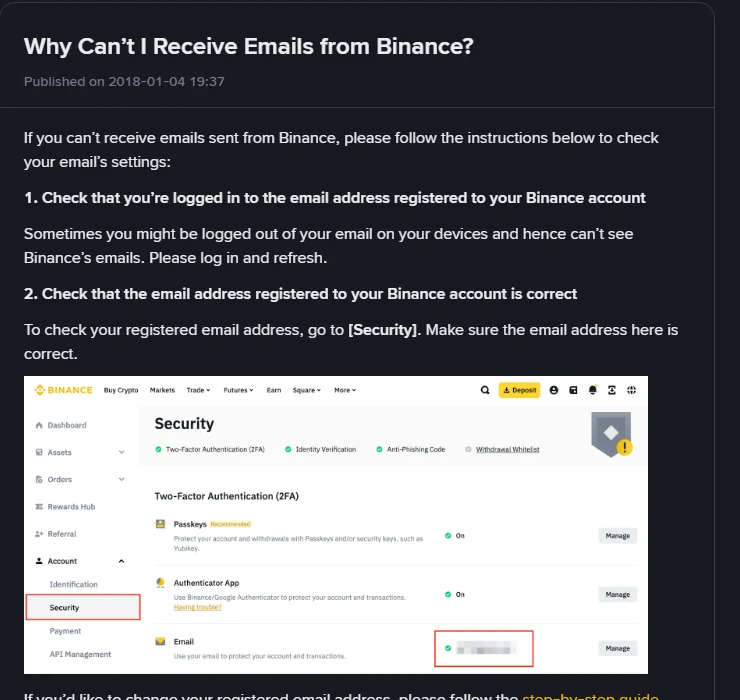
So the sequence is: check spam and any promotions-style auto-sorting, confirm which address is actually registered, then check whether the mailbox has room. Corporate and self-hosted domains filter harder than the free providers, which is why the same page recommends "registering your Binance account with email addresses from common domains, such as Gmail, Outlook, etc."
Case three: your region may have no SMS coverage
This one has nothing to do with your handset. The help page states that SMS verification has a coverage list, and tells users to check whether their country or region is supported.
If it is not, the answer is not to keep waiting. The page names the alternatives to use as your primary second factor instead: passkeys, BAuthenticator, or Google Authenticator. Authenticator apps generate codes on the device itself with no carrier involved, which makes them steadier than SMS even where SMS does work.
Case four: the code arrived but is rejected as expired or wrong
Sign-up codes expire. The registration guide specifies a 6-digit code and says to enter it within 30 minutes. After that the digits are dead and you need a fresh request — retyping the old ones just burns attempts, and repeated failures can trigger a temporary lock.
Also check you are not reading the wrong message. If you tapped resend several times, several codes are now sitting in your inbox and only the newest one is valid.
Last resort: resetting the number on the account
If nothing above works, the final item on the official list is resetting SMS authentication. It is straightforward, but it touches account security, so platforms normally impose a holding period afterwards during which some functions stay disabled. How long, and which functions, is shown on the screen where you make the change — the rules differ between platforms and get revised, so read the prompt rather than a blog post.
One piece of sequencing advice: if the account already holds funds, set up an authenticator app before you touch the phone number, so you are never left in a window where neither method works.
The pages these answers come from
The five SMS troubleshooting steps, the coverage list and the passkey/BAuthenticator/Google Authenticator alternatives are quoted from Why Can't I Receive SMS Verification Codes?. The email causes are quoted from Why Can't I Receive Emails from Binance?. Both pages show a publication date of 2018-01-04. The 30-minute code window comes from the registration guide. All three were opened and checked on 17 September 2026.
The registration flow itself, including the two choices that cannot be undone, is covered in Binance sign-up: the four entry points.