Safety
Write down the 16-digit setup key before you tap Next
Two-factor authentication is the last door between a stolen password and your funds. The setup key shown while you bind it decides whether you can restore access yourself — or lose withdrawals for 24 hours.
The step after registering is not funding the account — it is turning on two-factor authentication. Binance defines it as "a multi-layered security mechanism, designed to verify the identity of a user before" granting access, and the point is simple: a stolen password alone is no longer enough to get in.
What almost everyone skips is the screen in the middle of setup. It shows a QR code and a setup key. Most people scan the code and move on without reading the key — and that key is exactly what saves you when the phone is lost, replaced, or the app gets deleted.
Binding the authenticator on the web, in six steps
The official order runs like this:
- Log in, hover over the [Profile] icon and click [Account].
- Go to [Security], then [Manage] next to [Authenticator App].
- Click [Enable Authenticator App].
- A QR code and a setup key appear. The guide is explicit here: "Do not click [Next] before the BAuthenticator setup is complete." Scan the code in the phone app, or tap [Enter a setup key] if scanning fails; you should see an account named "Binance.com" appear in the app. Then go back to the browser and continue.
- Enter the 6-digit code the app generates.
- Done.
That warning in step four is worth respecting. The browser and the phone are two separate actions, and clicking Next before the app is actually holding the key is how people end up stranded halfway.
What the setup key actually is
The key is the account. The authenticator app does nothing more than run it through a time-based algorithm to produce six digits, which means any app holding the same key produces the same codes.
Two consequences. First, store it offline — on paper, or in a password manager. Not a screenshot in your phone's camera roll, and not a message to yourself; that puts the key and the lock in the same drawer. Second, replacing a device is then trivial: enter the same key in the new phone's authenticator and the codes come back.
Binance's own "change authenticator" flow relies on the same mechanism. Step five there reads: "You'll see a QR code and a 16-digit code. Scan the QR code with another authenticator or enter the 16-digit code manually. Please make sure you've completed this step in your new authenticator before clicking [Next]."
Losing the key costs you 24 hours of withdrawals
If the key was never saved and the phone is gone, the only route left is changing the authenticator. That is possible, but it has a stated price:
Please note in order to protect your account, withdrawals and P2P transactions will be disabled for 24 hours after you change your Authenticator.
The confirmation dialog repeats it in plain terms: withdrawals and P2P transactions disabled for 24 hours after changing your authenticator app.
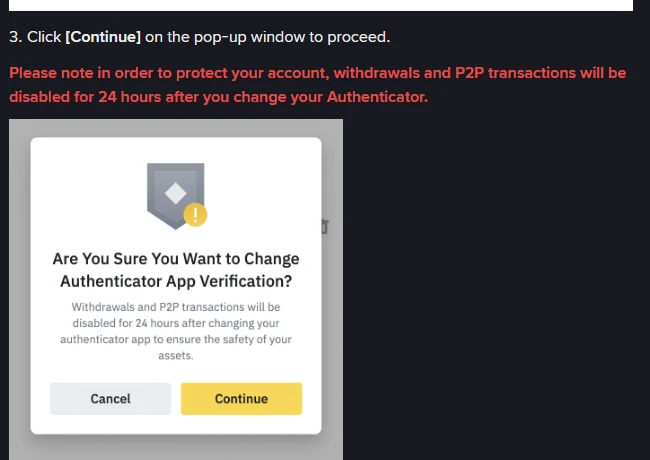
A day is not long in the abstract. It is long when it lands exactly when you want to act — phone just lost, account possibly compromised, funds you would rather move now. Saving the key is buying that day back in advance.
A habit worth ten seconds: bind two devices
The same guide notes that an authenticator account can be exported to another device, and that one app can hold several accounts. If you have a spare phone or a tablet, enter the same key on both while you are setting up. Then losing either one changes nothing.
The right time to do all of this is while the account is still empty. Reorganising your verification method after there are assets in it means every step carries risk and a waiting period.
Where this comes from
The 2FA definition, the six web setup steps, the "do not click Next" warning, the 16-digit code in the change flow and the 24-hour restriction all come from How to Enable Two-Factor Authentication with BAuthenticator on the Binance Website, published 2021-09-06. The page was read on 19 September 2026 and the screenshot is from that session.
The registration requirements are in Binance sign-up: the four entry points; if you are stuck earlier than that, waiting on a code, see Why your verification code never arrives.